> For the complete documentation index, see [llms.txt](https://docs.raysoft.store/raysoft/llms.txt). Markdown versions of documentation pages are available by appending `.md` to page URLs; this page is available as [Markdown](https://docs.raysoft.store/raysoft/english/3.-instructions/cod-instructions/bo7-external.md).
# BO7 External
### ⚠️ Complete pre-installation first
These are the specific instructions for **(BO7|WZ) 🎯 BO7 External**. Before continuing, make sure you have correctly configured the PC by following pre-installation and have restarted it. Then follow the steps in this guide in order.
[📚 Open pre-installation](https://docs.raysoft.store/raysoft/english/2.-pre-installation)
### **Important Information**
BO7 External is an external cheat designed with security as a priority. **We do not recommend using any spoofer unless your PC is already hardware banned**, as currently the risk of being banned by a spoofer is higher than the risk of being banned by the cheat itself.
#### 🛡️ If you have a PC BAN
If your PC has a **Hardware BAN** and you are using a temporary spoofer, follow **exactly this order**:
1. **Start and inject BO7 External first.**
2. **After completing the injection, start the Spoofer.**
> ⚠️ This order is important to correctly link the cheat's HWID to your PC and prevent the program from requesting a reset every time you want to play.
If your PC **does not have a Hardware BAN**, you do not need to use a spoofer.
***
### ⚙️ Requirements
Before starting BO7 External, make sure you meet the following requirements:
* Uninstall **OneDrive** from your PC.
* You have correctly completed **Pre-installation.**
***
### 🚀 Start the program
1. Download our Multiloader → [Download Raysoft Multiloader](https://mega.nz/folder/VYAx2AaR#x2hdq6ToLXyx11FJ1w0zVg)
2. Find BO7 External and run it.
3. Wait for the loader to open fully.
#### First launch
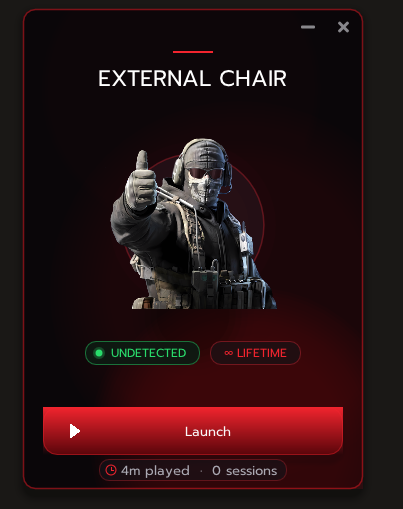
1. Enter the license you purchased.
2. Press **Login in**.
3. Click **Launch**.
Once the injection is complete, the Loader will close automatically.
> ⚠️ If you are using a temporary spoofer because of a PC BAN, remember: **BO7 External first, then the Spoofer.**
***
### 🎮 Controller setup
BO7 External supports controllers for **Xbox** and **PlayStation 4 / PlayStation 5**.
### 🟢 Xbox — ViGEmBus
To use an Xbox controller:
1. Install **ViGEmBus** → [**\[Download\]**](https://github.com/nefarius/ViGEmBus/releases/download/v1.22.0/ViGEmBus_1.22.0_x64_x86_arm64.exe)
2. Follow the installation process by clicking **Next** in each window.
3. When installation finishes, restart the PC if the installer asks you to.
4. Connect your Xbox controller and check that Windows recognizes it.
5. Open the Loader and run **BO7 External** normally.
> ℹ️ **Xbox does not require HidHide or DS4.**
***
### 🔵 PlayStation 4 / PlayStation 5 — DS4Windows
To use a PS4 / PS5 controller:
1. Install **DS4Windows** → [**\[Download\]**](https://ds4-windows.com/download/ryochan7-ds4windows/)
2. Install **ViGEmBus** → [**\[Download\]**](https://github.com/nefarius/ViGEmBus/releases/download/v1.22.0/ViGEmBus_1.22.0_x64_x86_arm64.exe)
3. Connect your controller using **USB or Bluetooth**.
4. Open DS4Windows and check that the controller appears correctly.
5. In **Settings**, enable **Hide DS4 Controller**.
6. In **Device Options**, enable:
* **DS4 Controller Support**
* **DualSense Controller Support**
7. Keep DS4Windows open in the background.
8. Open the Loader and run **BO7 External** normally.
***
## 🎮 Controller settings inside the cheat
Once BO7 External has started:
1. Open the tab **AIM**.
2. Go to the section **Controller**.
3. Enable **Enable Controller Support**.
4. In **Gamepad Aim Button**, we recommend using **RT (Trigger)** as your initial setting.
5. In **Controller Sensitivity**, we recommend starting with **17**.
> 💡 You can adjust sensitivity later to suit your preferences.
***
## 🎯 Start Call of Duty
Start **Call of Duty: Black Ops 7** normally through:
* **Steam**
* **Battle.net**
* **Xbox Game Pass**
We recommend running the game in:
**Borderless Fullscreen**
Once you are in the game:
1. The cheat will appear automatically after injection.
2. Press **INSERT** to open or close the menu.
3. Use **INSERT** to reopen the menu whenever you need it.
❤️ **Enjoy BO7 External!**
***
## 🖱️ Keyboard and mouse
If you play with keyboard and mouse, you do not need to configure any additional controller software.
Simply:
1. Start BO7 External.
2. Start Call of Duty.
3. Wait for the cheat to load.
4. Press **INSERT** to open the menu.
***
## ⚠️ Troubleshooting
#### The Xbox controller does not work
* Check that **ViGEmBus** is installed correctly.
* Check that Windows recognizes the controller.
* Close the game and restart the PC.
* Open the Loader again.
#### The PS4 / PS5 controller does not appear
* Check that DS4Windows detects the controller correctly.
* Check that **Hide DS4 Controller** is enabled.
* Check that **DS4 Controller Support / DualSense Controller Support** are enabled.
* Keep DS4Windows open in the background.
#### Aim Assist does not work
* Check that **Enable Controller Support** is enabled.
* Check that **Emulation Engine Status** shows **ACTIVE**.
* Check the button configured in **Gamepad Aim Button**.
#### The menu does not respond
1. Close the game.
2. Restart the PC.
3. Open the Loader again.
4. Run BO7 External again.
#### After a Windows or Call of Duty update
Wait until Raysoft confirms compatibility before running the product again. In Control Center → Tool Status → Check live status, you can open the published status; local Windows indicators do not confirm that the product is available.
If the game asks you to restart or closes unexpectedly, **restart the PC before running BO7 External again**.
***
## ❤️ Support
If you have followed all the steps and still have problems:
🎫 **Open a support ticket** and our team will help you.
Please provide as much information as possible about the problem and screenshots if needed.
**RaySoft Team ❤️**
[↩ Back to this section's index](https://docs.raysoft.store/raysoft/english/3.-instructions/cod-instructions)
### ✅ Before finishing
* You have followed the guide for the correct product and version.
* The application has reached the indicated state without errors.
* You have checked only the peripherals you use.
* If anything does not match, keep the message and the exact step before repeating installation.
### 💬 Need help?
[Open Raysoft support](https://discord.gg/raysoft)